
Last updated: 8 November 2026
If you want to check whether a contractor or business is CHAS accredited, there are 3 ways to verify its status online.
- Use the CHAS Contractor Search Tool on Chas official website. It’s free, but you must register as a CHAS client in the VeriforceONE portal. It shows CHAS specifically, plus the membership level, work categories and location.
- You can use the free SSIP Portal to check. It’s free (up to 10 free searches), no login, search by company name. It confirms the company holds a current assessment from an SSIP member scheme (CHAS is one), but it does not say which scheme.
- Simply request for a current certificate directly from the contractor.
I will explain the three methods in full details below how you can check CHAS accreditation online, what to look for on a certificate and what to do if you cannot find a company on the register.
It’s important that you know how to do a CHAS certificate check because it’ll help you make informed decisions about partners, vendors, or suppliers to safely work with, which in turn, benefits your own company’s compliance status.
TDRL: To verify a company’s CHAS accreditation online using the CHAS Contractor Search Tool, follow these steps:
- Visit the official CHAS website
Go to the official CHAS website. This is the primary source for all information related to CHAS accreditations.
- Access the CHAS VeriforceOne Client Portal
CHAS provides a searchable database of all accredited businesses through the VeriforceOne Client Portal.
This portal is a convenient cloud-based dashboard that offers all the procurement and supply chain management tools you need to find reliable contractors and mitigate risks to your supply chain. In fact, it’s the primary tool for verifying CHAS accreditation.
On the homepage, click the “Login” button at the top right corner.
Log in or register: Log in with your email and password if you have an existing account. New users should click “Register” and provide the required information to create an account.
- Search for the company
Within the VeriforceOne Portal, you will find a Contractor Search Tool. Enter the name of the company you wish to check into the search bar.
You can enter their business name, CHAS registration number, or other relevant details. This will help you confirm their accreditation status. The portal houses a database of over 32,500 CHAS-accredited contractors across the UK.
- Verify the company’s accreditation status
Once you find the company, check the details provided. A company that is CHAS-accredited will have a valid CHAS accreditation status listed. This status may also include registration number, accreditation level, and expiration date.
How to Check if a Company Is CHAS Accredited
There are three practical ways to how to check if a company is CHAS approved online.
1. Use the CHAS Contractor Search Tool through VeriforceONE
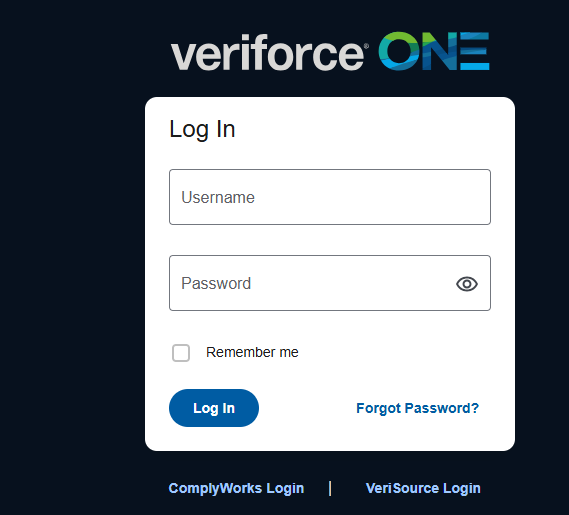
If you need to confirm if a company is specifically accredited by CHAS, use the CHAS Contractor Search Tool.
CHAS provides this facility through its VeriforceONE Client Portal. The portal is for organisations that need to find pre-qualified contractors and monitor supply chain compliance. And according to CHAS, its client portal provides access to a database of more than 32,500 pre-qualified contractors.
How to use the CHAS Contractor Search Tool:
- Visit the official CHAS website.
- Navigate to the client portal or select the VeriforceONE Client Portal option.
Register for client access or log in if you already have an account.
Open the Contractor Search Tool.
Enter the contractor’s registered business name.
Review the matching company profile and available accreditation information.
Check the accreditation level and relevant compliance details.
CHAS states that client access is free. However, you need to register or log in to access the client portal.
What should you look for in the search results?
When checking a company’s CHAS profile, pay attention to:
The registered company name. Ask for it in writing, or take it from an invoice or Companies House. Entries are held against the legal entity that was assessed, so a trading name such as “Mick’s Electrical” may return nothing while the registered name “M J Electrical Services Ltd” finds a match.
The CHAS accreditation level.
The company’s current compliance status.
The relevant accreditation or compliance expiry date.
The type of work or categories covered, where available.
Make sure the information relates to the actual business you intend to appoint. Similar company names do not necessarily mean they are the same legal entity.
2. Use the SSIP Portal
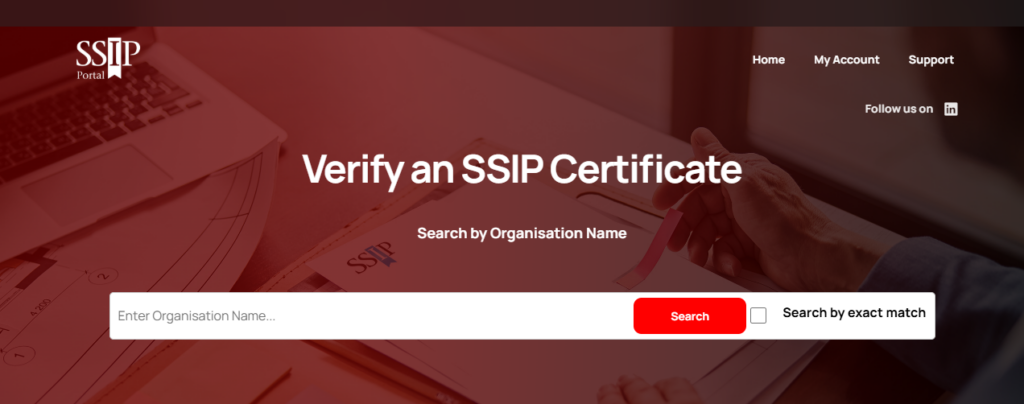
The SSIP Portal is a free online service that allows businesses and buyers to check whether a supplier has been assessed by an SSIP member scheme.
And since CHAS is one of the recognised SSIP member schemes, what this means is that you can use the portal to check whether a contractor holds recognised SSIP health and safety certification.
To check a company’s status:
Visit the SSIP Portal.
Find the supplier or company search facility.
Enter the company’s registered business name.
Review the search results and identify the correct business.
Check the certification information and its validity, where displayed.
If you cannot find the company using its full name, try searching with a shorter version of its registered name.
What does the result mean?
A matching, current entry indicates that the business has been assessed by an SSIP member scheme against the relevant SSIP requirements.
However, the SSIP Portal should not be treated as proof of CHAS membership specifically. It verifies recognised SSIP certification, not necessarily the identity of the scheme that carried out the assessment or the company’s CHAS tier. If a client or contract specifically requires CHAS accreditation, use the CHAS verification route as well.
3. Request and Check the Company's CHAS Certificate
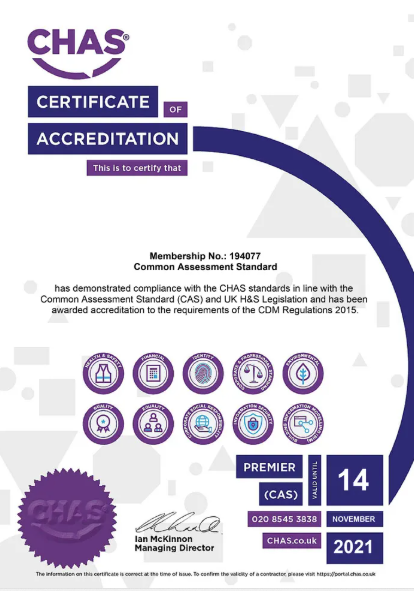
If you cannot access the VeriforceONE Client Portal, just ask the contractor to show their current certificate from Chas.
A company claiming to hold CHAS accreditation should be able to provide its relevant certification documentation. When you receive the certificate, check the following:
Company name: Does the name match the business you are dealing with?
Membership or certificate number: Is there a reference you can use to confirm the certification?
Accreditation level: Does the certificate show the relevant CHAS assessment or level?
Issue date: When was the certificate issued?
Validity or expiry date: Is the certification still current?
Scope or classification: Does the certification relate to the type of work being undertaken?
Do not rely on an old certificate or a CHAS logo displayed on a company’s website as proof of current accreditation.
A certificate is useful supporting evidence, but you should cross-check its validity through the appropriate CHAS or SSIP verification route. If the information does not match, contact CHAS for clarification.
Benefits of using the CHAS client portal (VeriforceONE)

If you buy from or appoint contractors regularly, the client account is worth having beyond a one-off check:
- Search pre-qualified contractors by location, trade and compliance level
- Find contractors assessed against standards such as SSIP and the Common Assessment Standard
- See the accreditation status of the contractors in your supply chain in one dashboard
- Save time on pre-qualification, because the first-stage health and safety checks have already been done
Working with accredited contractors helps protect your people and your reputation, and it makes your own supply chain compliance easier to evidence.
What if you can’t find the company?

A missing entry does not always mean a company is not accredited. Work through these in order:
- Try variations of the name. Search the registered name, a shortened version, and check for a recent change from sole trader to limited company. The old entry may still sit under the old name.
- Contact CHAS directly. Use the details on the CHAS contact page and give them the company name and any registration details.
For non-members, you can reach CHAS through the following channels:
- Phone: 0345 521 9222
- Email: sales@chas.co.uk
- Hours: Monday – Friday, 08:00 – 17:30
For CHAS members, use these contact details:
- Phone: 0345 521 9111
- Email: admin@chas.co.uk
- Hours: Monday – Friday, 08:00 – 17:30
- Ask the company for proof. A genuinely accredited company should be able to give you a current certificate and tell you its level and compliance expiry date.
Want to check your own CHAS listing?
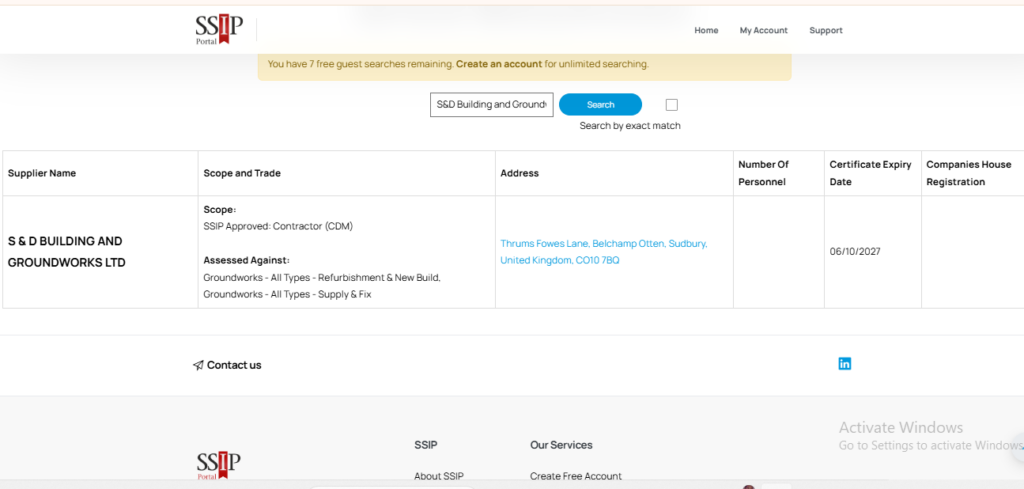
If you are the contractor, search your own registered company name on the SSIP Portal exactly as a buyer would. Most member schemes upload new certifications within about a day, and it can occasionally take up to 72 hours to appear. If nothing shows after that, contact the scheme that assessed you, because the SSIP Portal does not edit entries itself.
Also check that your work categories and location are correct, since buyers filtering by trade will not see you if they are wrong.
Frequently asked questions
There is no CHAS register you can search from Google. Instead, there are two free routes: the SSIP Portal, which needs no login, and CHAS’s own Contractor Search Tool, which needs a free client account.
Not in the form most people picture. CHAS offers its Contractor Search Tool free of charge, but it sits inside the VeriforceONE Client Portal, which is a dashboard for buyers rather than an open web page. You need to register first.
The closest thing to an open register is the SSIP Portal. Safety Schemes in Procurement (SSIP) runs it, and all of its member schemes, including CHAS, SafeContractor and Constructionline, assess against the same core criteria. That is why the portal treats them as equivalent and does not name the scheme behind each entry.
So if a client says “they must be CHAS specifically”, the SSIP Portal alone will not settle it. You will need the CHAS search tool or the contractor’s certificate as well.
No. It confirms the company holds a current SSIP-recognised assessment but does not name the scheme. Use the CHAS Contractor Search Tool or ask for the certificate if you need CHAS by name.
Search the company’s registered name on the SSIP Portal and the CHAS Contractor Search Tool, then check the level and compliance expiry date on the register entry. Do not rely on the certificate PDF alone.
No. CHAS accreditation does not automatically mean that a contractor is suitable for every project.
CHAS accreditation demonstrates that a business has met the requirements of the relevant assessment standard. It provides an important part of the contractor prequalification process.
However, clients still need to consider whether the contractor is suitable for the particular work they intend to undertake.
Depending on the project, additional checks may include:
Relevant experience and previous projects.
Employee training and qualifications.
Employers’ and public liability insurance.
Risk assessments and method statements (RAMS).
Competence of the workers carrying out the work.
Site-specific health and safety arrangements.
Equipment and resources required for the job.
For example, a contractor may hold valid CHAS accreditation but still need to demonstrate that its workers have the correct training and experience for a particular construction project.
CHAS itself explains that its assessment does not replace the client’s second-stage, project-specific assessment.
You should therefore treat accreditation as evidence of prequalification, not a substitute for your own contractor checks.
Standard covers a health and safety assessment including SSIP. Advanced meets SSIP and the former PAS 91. Elite meets the Common Assessment Standard.
After certification, most member schemes upload to the SSIP Portal within about 24 hours, and it can take up to 72 hours for the entry to be visible.
Yes, there are free ways to check a company’s health and safety accreditation, although the available information depends on the verification method you use.
The two main options are:
SSIP Portal: A publicly accessible search tool that allows you to check whether a company holds current certification from an SSIP member scheme.
CHAS Contractor Search Tool: Available through the VeriforceONE Client Portal, which gives CHAS clients access to contractor information and accreditation details.
The important difference is that an SSIP Portal search confirms recognised SSIP certification but does not necessarily confirm that CHAS was the specific scheme that assessed the company or identify its CHAS membership level.
If you need to confirm CHAS accreditation specifically, use the CHAS Contractor Search Tool or request confirmation from CHAS.
Need help with CHAS accreditation?

The application is where many contractors get stuck. At Train in Health and Safety, we are a training and accreditation support provider based in Waltham Abbey, England, with nearly 10 years of experience helping businesses through CHAS accreditation, as well as SafeContractor and Constructionline.
Here is how we can help:
- Complete your CHAS application form
- Gather the evidence your application needs
- Help you create and implement essential health and safety systems
- Meet with you to discuss your unique situation
- Act as your competent safety advisor if you do not have one
To learn more, email info@traininhealthandsafety.com or book a free call with Sam, our CHAS advisor, on +44 20 8059 3633.
WE CAN HELP YOU GET CHAS ACCREDITED!
